Powered by
PNG Facts
  • Home
  • News
  • Business News
  • Economy News
  • PNG Politics
  • Sports News
  • International News
  • Corruption News
    • Expose Corruption in Papua New Guinea
    • Expose Police Brutality in PNG
    • Gender Based Violence in PNG
    • Kramer Report
  • Mining Watch
    • PNG Kumuls Videos
    • List of Mines in PNG
  • Jobs
    • Jobs in PNG
    • Jobs in PNG
    • Seasonal Employment Overseas
    • Applying for Jobs and Employments in Papua New Guinea
  • Education News
  • Scholarships
  • Health News
  • Bzzmart Online Shopping Platform
  • Pacific
  • Used Cars
    • Used Cars for sale in PNG
  • Buy or Rent Homes
  • Travel
    • City of Port Moresby
    • Adventure and Destination
    • Hotels & Lodges in PNG
    • Hotels & Lodges in Mendi, Southern Highlands Province
    • Hotels & Lodges in Lorengau, Manus Province
    • Hotels in Oro Province
    • Hotels and Lodges in ESP
    • Hotels & Lodges in Kavieng
    • Hotels and lodges in Kimbe
    • PNG Photo Gallery
    • Map of Papua New Guinea
  • PNG
    • Government >
      • PNG National Anthem and Pledge
      • Overview
      • PNG Overseas Missions
      • Office of the PNG Prime Minister >
        • Prime Ministers of Papua New Guinea
      • Papua New Guinea Parliament
      • Provinces in Papua New Guinea >
        • PNG Provincial Goverments
        • Southern Highlands Province
        • West Sepik Provice
      • PNG Government Overseas engagement >
        • List of PNG Parliament Members 2017 - 2022
      • Office of the Papua New Guinea Opposition
      • Politics >
        • PNG Political Parties & Members
        • Papua New Guinea Cabinet Ministers
      • Royal Papua New Guinea Constabulary >
        • PNG Police Recruitments and Applications
    • PNG's Famous People
    • PNG Education System >
      • Overview
      • Education Reform in PNG
      • Study Abroad
      • Universities in Papua New Guinea >
        • University of Papua New Guinea
        • University of Technology PNG
        • Divine Word University
        • University of Goroka
        • Pacific Adventist University
        • University of Natural Resources and Science - PNG
      • Institutions in PNG >
        • Teachers Colleges in Papua New Guinea
      • Research Papers in PNG
    • PNG Economy >
      • PNG EconomyOverview
      • Banks in Papua New Guinea
      • List of Airlines in Papua New Guinea
      • Cost of living in Papua New Guinea
      • Doing Business in Papua New Guinea
    • Health
    • Pacific Jokes
    • Gospel Music
  • Computer Tech
    • Tech Help
    • Top Weebly designed Websites >
      • HOW TO RECOVER FILES WITH SHORT CUTS OR HIDDEN IN FLASH DRIVE OR EXTERNAL HARD DRIVE
      • How to remove Stubborn Computer Virus
      • Creating Login or Sign in Membership page in Weebly sites
      • How to auto insert Table of Content in Word
      • Top Weebly Website Examples and Portfolio
      • Weebly Membership Sign in feature available
    • Send Free SMS in PNG
    • Radio Stations
    • Television stations >
      • Kundu 2 Television Service of Papua New Guinea
  • PNG Information Directory
    • Business Names Registration
    • Registering a Company in PNG
    • Tour Operators in PNG
    • Festivals and Tourism in Papua New Guinea
    • Lae City , Papua New Guinea
    • Armoured Car Services in Papua New Guinea
    • Taxi Services in Port Moresby
  • Computer Resources
  • Classifieds
  • About us
  • Contact Us
  • Competition
  • Advertisement
    • Payments
  • Privacy Policy
  • SP PNG Hunters News
  • Weebly Forums
  • National Football Stadium, Port Moresby
  • Work Permits and VISAs in PNG : Guide
  • Seasonal Workers Program for PNG
  • List Your Business on PNGFacts.com
  • Twodot Business Solutions
  • Become a Sponsor
  • Mt Giluwe Lodge
  • Papua New Guinea Defence Force
    • PNG Defence Force Recruitment and Applications
  • Political parties in PNG
    • PNC Party
    • PANGU Party
    • National Alliance Party
    • United Labour Party ULP
    • People's Progress Party PPP
  • NID PNG
  • Employment VISA in PNG
  • Business VISA
  • Visitor VISA
  • Police Clearance in Solomon Islands
  • PNG Electoral Commission
  • PNG Election Results
  • PNG Kina Exchange Rate
  • PNG Digicel Cup

How to place Email Subscription on Weebly Website 

10/2/2015

0 Comments

 
One of the ways in which you can engage with your visitors to your website is through email subscription. Most businesses online use email subscription to engage with their customers.  In order to have email subscrption dialogue box on your weebly website, your must make us of RSS Feed. 

An RSS feed element is automatically added to the sidebar of any  weebly blog you create.  The RSS feed allows blog visitors to receive automatic updates about your blog if they are using a feed reader like Google Reader. There are dozens and dozens of such readers available for Windows, Mac OS, iPhones, iPads, Android devices, and so on from there. You can read a bit more about RSS Feeds in this help article. 

But what if you want to offer your visitors an option to follow your blog other than just via RSS? In this case, you can offer them an option to sign-up for updates to your blog via email. This can be done for free through a Google service called Feedburner. Read our instructions below to learn how to set it up, but please note that this is not a Weebly service and not something we can directly support. 
  
Start by going to the Feedburner login / signup page at feedburner.google.com. Log in to a Google / Gmail account or create a new one. Then you'll be prompted to add your blog's RSS feed. 

Check out step by step details on how to have email subscriptions on your weebly website here .

Related post
  • How to make your weebly website profitable 
0 Comments

How to make your weebly website profitable 

10/2/2015

0 Comments

 
There are several ways you can make  a weebly website profitable. One way is to build a well designed website for your business. This is because a simple, well-designed website is essential for turning your visitors into paying customers. From product images to streamlined checkout, there are several key conversion rate optimization techniques that you can employ to help turn clicks into sales.

Here are five tips to get you started.

1. Show off Your Products

Design your website around large images that entice visitors and present product benefits. On your homepage, consider using a full-screen image of a popular or top selling item to showcase your best offerings.

Use high quality images that work on a variety of devices. Make sure the product stands out from other parts of the image such as the background. 

2. Streamlined Checkout

Make checkout simple. A streamlined checkout experience limits cart abandonment and helps users complete transactions quickly. The integrated shopping cart built into your store provides a secure checkout experience with minimal friction during order completion. You can include shipping and return policy information available via hover over along with a note to seller field that lets customers add notes directly from the cart. This is all designed to provide a customizable and informative checkout experience that remains streamlined. Use the mobile app to monitor your conversions on the go and watch orders come in on in real time.

3. Make Buttons Large and Use Color

Play off the urge to buy items on impulse by creating buttons that are large and colorful. The easier a button is to find and click, the more likely you are to convert a sale.

The color you choose for buttons should be consistent and match the palette of your website. It should also stand in contrast to other elements on the page. Bold colors such as red or yellow are popular. Put boxes around buttons to make them look more appealing and clickable. Small Batch Baking Co. does a great job of this with pink "Shop Now" and "Add to Cart" buttons against a white background.

The button element allows you to create and style these buttons, while linking them to product and product pages. And the best thing is you can set it up with only a few clicks!

4. Don't Require Registration to Check Out

Not every customer is going to register on your website, so why prevent them from making a purchase? Allow users to checkout without creating an account.

If you really want registration details, consider asking after check out. By requesting information post-purchase, you are less likely to put up a user roadblock.

5. Focus on Simple Language and Typography

Everything about the sales process should be simple, and that includes the language and typefaces you use on your site.

Consider simple language for buttons such as “Buy Now,” “Add to Cart” or “Purchase.” Use the same phrases in every instance that presents the same action. When it comes to typography, opt for sans serif fonts that are easy to read at a variety of sizes. In the Design tab you can change fonts for all sections of your website and test the best location/style combinations in order to find the perfect typeface for various conversion opportunities.

Now that you have a few new techniques in mind, it's time to start optimizing your website! What conversion optimization techniques have you found most helpful on your website?

Source: weebly.com/blog

Related Post
  • How to connect or share Mobile Phone Internet to your computer


0 Comments

How to connect or share Mobile Phone Internet to your computer

6/2/2015

0 Comments

 
There are several ways to  connect your Mobile Phone Internet to your computer. We will outline three basic ways here: 
  •  tethering
  • Bluetooth 
  • USB
First and foremost thing to do is to  enable mobile phone data/ internet on your phone. Follow the steps below to achieve this.

Enabling Data/Internet on your Mobile Phone

1. Go to your phones settings
2. Go to Mobile Network Setting
3. Check Data Enable.
The steps above activates internet on your mobile phone. Now you may want to share this internet to your computer. You can do that by, tethering, bluetooth and USB

Tethering 
Use the following steps tether your mobile phone internet to your computer. 

1. Go to your mobile phone settings
2. Go to Tethering  portable hotspot
3. Check Portable Wi-Fi hot spot.
Note: Your computer should communicate with your mobile phone. Note: Make sure to activate your wireless network on your computer. 

Bluetooth Internet
If you have Bluetooth on your computer, you can use Bluetooth internet. 
Simply activate bluetooth internet both on your computer and mobile phone.

USB
You can use USB tethering to share your mobile phone internet.
1. Connect your phone to a computer with a recommended USB code. 
2. Go to your phone settings 
3. Check Tether with USB

You should be able to share/ tether internet.  Note: Your mobile phone internet must be activated prior to using USB tethering service. 

  • How to schedule Posts in Weebly Blog


0 Comments

How to schedule Posts in Weebly Blog

5/10/2014

0 Comments

 
Weebly has introduced power feature in its platform. You can now schedule posts and publish them on specific times on weebly. This tutorial takes you through how you can schedule blog posts.

Steps:

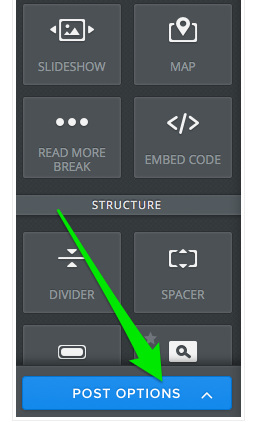
1.       Go to your weebly  blog  editor’s interface and locate the following task pane on the left of your screen. Click on Post Options.
 

Picture
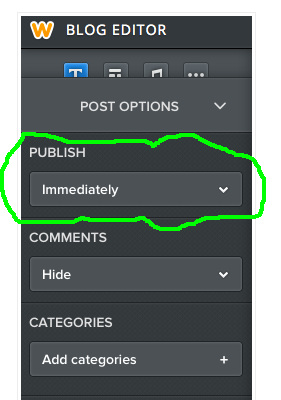
2     After you click on Post Options, you will have the following drop down menu.  We are interested in the Publish menu. By default the schedule option is “immediately”. Change this to which every preference you want for the schedules of your posts.
Picture
3. Usually, you can indicate times when your posts will be posted. Enjoy

Related Post:
  • How to add  Google Adsense code to Weebly Blog Posts 


0 Comments

How to add  Google Adsense code to Weebly Blog Posts 

4/10/2014

2 Comments

 
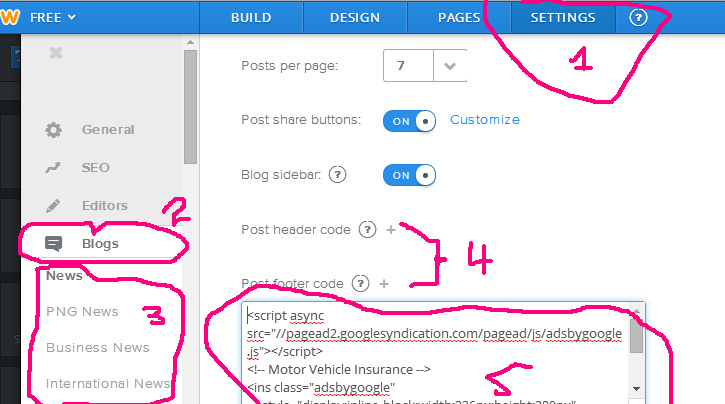
Good news for Weebly Users. Now you can add google adsense code to weebly blog posts. This tutorial outlines how you can achieve this. Thanks to weebly for introducing this feature.  The screen shot below shows how adsense code is added to the footer of all the blog posts in weebly. 
Picture
Steps 
  1. Login into your weebly website
  2. Go to your website Settings tab (see figure above.  label 1)
  3. Click on Blogs on the left pane (see figure above. label 2)
  4. If you have several blogs on your site, they will be listed below blogs (See label 3 above). Click on the blog that you want to add the adsense code.
  5. You will be given blog settings for that blog you  click on the right pane.  Click on the add symbol (+) under Post Header Code if you want to add adsense in the header of the blog posts. Or click the add sign under  Post Footer Code if you want to add asdense on the footer of the blog post (Refer to label 4).
  6. Paste the adsense code in the field you got from step 5. 
  7. Hit Save and you are done.
2 Comments

How to control number of posts on Weebly blog posts

18/9/2014

2 Comments

 
Picture
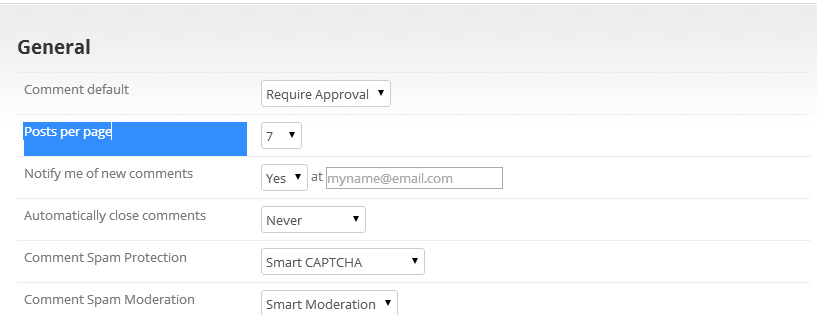
Now you can decide the number of posts you want to show on weebly blogs. Usually there used to be 10 posts by default but now Weebly has made available a feature that can control the number of posts. 

As you can see from the figure above the feature "Posts per page" has been added to accomplish this.  Follow the following steps to configure your blog posts to desired settings.

1. Go to your blog edit
2. click on Blog Settings
3. Change the number of posts you want to display under "Posts per page" settings.
4. save & Publish 

Related Posts
  • How to  apply different background on Weebly sidebar 


2 Comments

How to  apply different background on Weebly sidebar 

18/9/2014

0 Comments

 
This is a simple step to change the background of a weebly sidebar. We assume that you already know how to use weebly.

 Steps.
1. Open main_style.css in your weebly editer. 
2. Locate the code below. 

.sidebar {
vertical-align: top;
background: #ffffff;
border: 1px solid #000000;
}
3. The background color is indicated by background: #ffffff;

Depending on your theme the default Feature Area Background color may be different. The important part is to     locate the background color code.

d) You can change the brackground color code  (#ffffff;)  to anything you like. 

Note: In the event that you could not find the code in step 2, copy and  paste the above code below the last line of the main_style.css and make necessary changes of the background. 

 Step4 : Save & Publish

  • How to point subdomain to Weebly 


0 Comments
<<Previous
Forward>>

    Weebly Forums

    On this page, we discuss some of the useful tips on designing a weebly websites. Feel free to comment on the post here. 

    Categories

    All
    How To Add Google Adsense Code To Weebly Blog Post
    Weebly Forums

    RSS Feed

Share this

Search Papua New Guinea Database >>

Study Awards 
Scholarships 
Sponsors
Universities

Seasonal Employment
Job/Employment

Study in PNG
Tech Pacific 
Privacy Policy 


PNG News 
Business News
International News
Sports News                                Kumul players' profile
Used Cars 
Government
Constitution
Education
Health
City of Port Moresby
Hotels/Lodges
Faces of PNG
Computer Guides
Weebly Forums
Tok Pisin Dictionary
Adventures Photos 
Travel
Kokoda Track
Tours 
Gospel Music
Survey  
Contact Us
About Us 
Send Free SMS
PNG Jokes 
Subscribe to our weekly newsletter.
​
Useful Sites
  • Scholarships Awards
  • Scholarships for Study Abroad 
  • Study Scholarships ​
  • PNG Online School
Home: PNG News :Travel : Government System: Computer Tech : About us:  Contact : Disclaimer : Sitemap : Login  Copyright & Disclaimer    © 2012 -2025 PNG Facts: All rights reserved: 
 Website developed by  Kilikalo  Technology & Business Solutions Ltd   

About

About 
Contact Us
Our Service 

Terms 

Privacy 
Disclaimer 
Copyright 

Advertisement 

Sitemap 
Get A Webpage 
Advertisement 
​
Donate /Sponsor 
 COPYRIGHT 2025. ALL RIGHTS RESERVED.
  • Home
  • News
  • Business News
  • Economy News
  • PNG Politics
  • Sports News
  • International News
  • Corruption News
    • Expose Corruption in Papua New Guinea
    • Expose Police Brutality in PNG
    • Gender Based Violence in PNG
    • Kramer Report
  • Mining Watch
    • PNG Kumuls Videos
    • List of Mines in PNG
  • Jobs
    • Jobs in PNG
    • Jobs in PNG
    • Seasonal Employment Overseas
    • Applying for Jobs and Employments in Papua New Guinea
  • Education News
  • Scholarships
  • Health News
  • Bzzmart Online Shopping Platform
  • Pacific
  • Used Cars
    • Used Cars for sale in PNG
  • Buy or Rent Homes
  • Travel
    • City of Port Moresby
    • Adventure and Destination
    • Hotels & Lodges in PNG
    • Hotels & Lodges in Mendi, Southern Highlands Province
    • Hotels & Lodges in Lorengau, Manus Province
    • Hotels in Oro Province
    • Hotels and Lodges in ESP
    • Hotels & Lodges in Kavieng
    • Hotels and lodges in Kimbe
    • PNG Photo Gallery
    • Map of Papua New Guinea
  • PNG
    • Government >
      • PNG National Anthem and Pledge
      • Overview
      • PNG Overseas Missions
      • Office of the PNG Prime Minister >
        • Prime Ministers of Papua New Guinea
      • Papua New Guinea Parliament
      • Provinces in Papua New Guinea >
        • PNG Provincial Goverments
        • Southern Highlands Province
        • West Sepik Provice
      • PNG Government Overseas engagement >
        • List of PNG Parliament Members 2017 - 2022
      • Office of the Papua New Guinea Opposition
      • Politics >
        • PNG Political Parties & Members
        • Papua New Guinea Cabinet Ministers
      • Royal Papua New Guinea Constabulary >
        • PNG Police Recruitments and Applications
    • PNG's Famous People
    • PNG Education System >
      • Overview
      • Education Reform in PNG
      • Study Abroad
      • Universities in Papua New Guinea >
        • University of Papua New Guinea
        • University of Technology PNG
        • Divine Word University
        • University of Goroka
        • Pacific Adventist University
        • University of Natural Resources and Science - PNG
      • Institutions in PNG >
        • Teachers Colleges in Papua New Guinea
      • Research Papers in PNG
    • PNG Economy >
      • PNG EconomyOverview
      • Banks in Papua New Guinea
      • List of Airlines in Papua New Guinea
      • Cost of living in Papua New Guinea
      • Doing Business in Papua New Guinea
    • Health
    • Pacific Jokes
    • Gospel Music
  • Computer Tech
    • Tech Help
    • Top Weebly designed Websites >
      • HOW TO RECOVER FILES WITH SHORT CUTS OR HIDDEN IN FLASH DRIVE OR EXTERNAL HARD DRIVE
      • How to remove Stubborn Computer Virus
      • Creating Login or Sign in Membership page in Weebly sites
      • How to auto insert Table of Content in Word
      • Top Weebly Website Examples and Portfolio
      • Weebly Membership Sign in feature available
    • Send Free SMS in PNG
    • Radio Stations
    • Television stations >
      • Kundu 2 Television Service of Papua New Guinea
  • PNG Information Directory
    • Business Names Registration
    • Registering a Company in PNG
    • Tour Operators in PNG
    • Festivals and Tourism in Papua New Guinea
    • Lae City , Papua New Guinea
    • Armoured Car Services in Papua New Guinea
    • Taxi Services in Port Moresby
  • Computer Resources
  • Classifieds
  • About us
  • Contact Us
  • Competition
  • Advertisement
    • Payments
  • Privacy Policy
  • SP PNG Hunters News
  • Weebly Forums
  • National Football Stadium, Port Moresby
  • Work Permits and VISAs in PNG : Guide
  • Seasonal Workers Program for PNG
  • List Your Business on PNGFacts.com
  • Twodot Business Solutions
  • Become a Sponsor
  • Mt Giluwe Lodge
  • Papua New Guinea Defence Force
    • PNG Defence Force Recruitment and Applications
  • Political parties in PNG
    • PNC Party
    • PANGU Party
    • National Alliance Party
    • United Labour Party ULP
    • People's Progress Party PPP
  • NID PNG
  • Employment VISA in PNG
  • Business VISA
  • Visitor VISA
  • Police Clearance in Solomon Islands
  • PNG Electoral Commission
  • PNG Election Results
  • PNG Kina Exchange Rate
  • PNG Digicel Cup